Hello, how can we help you better?
A blog to help you learn, build, and grow your knowledge business
Hello, how can we help you better?
A blog to help you learn, build, and grow your knowledge business

The FreshLearn API is based around REST. We return JSON for every request.
This is unique API key which you will use in the API’s .
To start using the FreshLearn API, You have to login to your Admin account and go to Settings -> User and click on your user. You will find the API Key.
API Methods
FreshLearn API lets you send the information about member and course enrollment related details seamlessly.
Get Member
Retrieve all of the existing member for the authenticated user.
https://api.freshlearn.com/v1/integration/member
Header Parameters
Key |
Value |
api-key |
This is the request header parameter, unique key assigned in your admin settings. |
cURL example
curl -X GET --header 'Accept: application/json' --header 'api-key: ffec555c3fc0a0882f2720weewew'' ‘https://api.freshlearn.com/v1/integration/member' }
Example Response: 200 OK
{
"id": 39744,
"fullName": "Rahul Mehta",
"email": "[email protected]",
"phone": "9898121211",
"city": "Hyderabad",
"source": "Zapier",
"message": "Member created successfully ",
"createdDate": "2021-04-27"
}
{
"id": 39745,
"fullName": "Manisha Mehta",
"email": "[email protected]",
"phone": "9898121211",
"city": "Hyderabad",
"source": "Zapier",
"message": "Member created successfully ",
"createdDate": "2021-04-27"
}
Create Member
Adds a New Member
https://api.freshlearn.com/v1/integration/member
Header Parameters
Key |
Value |
api-key |
This is the request header parameter, unique key assigned in your admin settings. |
Request Parameters:
In each POST Request body following parameters need to be sent in JSON
Mandatory, Member’s email address |
|
fullName |
Mandatory, Member’s full name |
phone |
Member’s Phone Number |
city |
Member’s city of residence |
source |
Mandatory, Zapier/FreshLearn/etc |
cURL example
curl -X POST \
https://api.freshlearn.com/v1/integration/member \
-H 'api-key: ffec555c3fc0a0882f2720weewew' \
-H 'content-type: application/json' \
-d '{{'{'} "email": "[email protected]","fullName": "John Sculley",
"phone": "0113452310", "city": "Seattle", "source": "Zapier’
}
Example Request
{
"email": "[email protected]",
"fullName": "John Sculley",
"phone": "0113452310",
"city": "Seattle",
"source": "Zapier"
}
Example Response: 201 Created
{
"id": 39744,
"fullName": "John Sculley",
"email": "[email protected]",
"phone": "0113452310",
"city": "Seattle",
"source": "Zapier",
"message": "Member created successfully ",
"createdDate": "2021-04-27"
}
Update member information based on registered email
https://api.freshlearn.com/v1/integration/member/update
Header Parameters:
Key |
Value |
api-key |
This is the request header parameter, unique key assigned in your admin settings. |
Request Parameters:
In each PUT Request body following parameters need to be sent in JSON
Mandatory, Member’s email address, (email can not be modified) |
|
fullName |
Mandatory, Member’s full name |
phone |
Member’s Phone Number |
city |
Member’s city of residence |
source |
Mandatory, Zapier/FreshLearn/etc |
cURL example
curl -X PUT \
https://api.freshlearn.com/v1/integration/member/update \
-H 'api-key: ffec555c3fc0a0882f2720weewew' \
-H 'content-type: application/json' \
-d '{ "email": "[email protected]","fullName": "John Sculley",
"phone": "0113452310", "city": "Seattle", "source": "Zapier’
}'
Example Request
{
"email": "[email protected]",
"fullName": "John Sculley",
"phone": "0113452310",
"city": "Seattle",
"source": "Zapier"
}
Example Response: 200 OK
{
"id": 39744,
"fullName": "John Sculley",
"email": "[email protected]",
"phone": "0113452310",
"city": "Seattle",
"source": "Zapier",
"message": "Member created successfully ",
"createdDate": "2021-04-27"
}
Enroll existing member in a course
https://api.freshlearn.com/v1/integration/member/enroll
Parameters:
Key |
Value |
api-key |
This is the request header parameter, unique key assigned in your admin settings. |
Request Parameters:
In each POST Request body following parameters need to be sent in JSON
courseId |
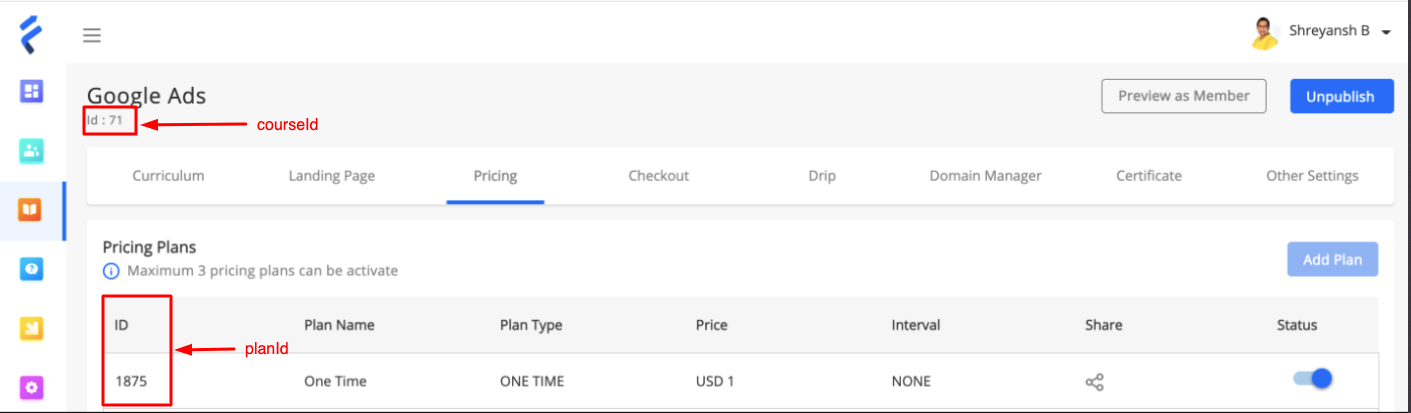
Mandatory, Course unique identifier from Admin Portal.You will find this under the course name. See here |
planId |
Mandatory, You will find this against the course -> pricing. |
memberEmail |
Mandatory, Member’s Email Address, |
paymentGateway |
STRIPE/RAZORPAY/PAYPAL/MANUAL/FREE |
paymentType |
CHEQUE/ONLINE/CASH/GIFT/RECURRING/OTHER |
reference |
References if any for enrollment |
transactionDate |
Payment transaction date in ‘yyyy-MM-dd’ format |
transactionId |
Mandatory, Payment unique identifier for the enrollment |
source |
Mandatory, Zapier/FreshLearn/etc |
cURL example
curl -X POST \
https://api.freshlearn.com/v1/integration/member/enroll \
-H 'api-key: ffec555c3fc0a0882f2720weewew' \
-H 'content-type: application/json' \
-d '{ "courseId": 39555,"planId": 40234, "memberEmail":
"[email protected]","paymentGateway": "stripe",
"paymentType": "cheque", "reference": "Course Enrollment Fee",
"transactionDate": "2021-01-01","transactionId": "abc_1123345",
"source": "zapier"
}
Example Request
{
"courseId": 39555,
"planId": 40234,
"memberEmail": "[email protected]",
"paymentGateway": "stripe",
"paymentType": "cheque",
"reference": "Course Enrollment Fee",
"transactionDate": "2021-01-01",
"transactionId": "abc_1123345",
"source": "zapier"
}
Example Response: 200 OK
{
"enrollmentId": 39745,
"courseId": 39555,
"memberEmail": "[email protected]",
"planId": 40234,
"transactionId": "abc_1123345",
"transactionDate": "2021-01-01",
"paymentType": null,
"paymentGateway": null,
"reference": "Course Enrollment Fee",
"source": "zapier",
"createdDate": "2021-04-27"
}
Course Completed Members
https://api.freshlearn.com/v1/integration/member/completed-courses
Parameters:
Key |
Value |
api-key |
This is the request header parameter, unique key assigned in your admin settings. |
cURL example
curl -X GET \
https://api.freshlearn.com/v1/integration/member/completed-courses \
Here is the sample response
{
"id": 1011804,
"courseId": 157636,
"courseName": "Email Marketing Mastery",
"email": "[email protected]",
"amount": 245,
"planId": 40234,
"planName": "Premium Subscription",
"courseCompletionTime": "2023-12-18",
"createdTime": 1702888189,
"domainId": "57",
"rating": "null",
"courseCompletion": "100",
}
Course Enrollment for New and Existing Members:
Enroll Course for New and Existing Members:
https://api.freshlearn.com/v1/integration/member/createMemberAndEnroll
Key |
Value |
api-key |
This is the request header parameter, unique key assigned in your admin settings. |
Request Parameters:
In each POST Request body following parameters need to be sent in JSON
Mandatory, Member’s email address |
|
fullName |
Mandatory, Member’s full name |
phone |
Member’s Phone Number |
city |
Member’s city of residence |
source |
Mandatory, Zapier/FreshLearn/etc |
courseId |
Mandatory, Course unique identifier from Admin Portal.You will find this under the course name. See here |
planId |
Mandatory, You will find this against the course -> pricing. |
paymentGateway |
STRIPE/RAZORPAY/PAYPAL/MANUAL/FREE |
paymentType |
CHEQUE/ONLINE/CASH/GIFT/RECURRING/OTHER |
reference |
References if any for enrollment |
transactionDate |
Payment transaction date in ‘yyyy-MM-dd’ format |
transactionId |
Mandatory, Payment unique identifier for the enrollment |
source |
Mandatory, Zapier/FreshLearn/etc |
Example Request
{
"fullName": "John D'Souza",
"email": "[email protected]",
"phone": "9898121211",
"city": "Toronto",
"state": "Telangana",
"country": "Ontario",
"uidNumber": "Canada",
"createdDate": "2021-04-27",
"description": "Enrolment",
"message": "string",
"courseId": 39555,
"planId": 0,
"paymentGateway": "STRIPE",
"paymentType":"ONLINE",
"reference": "string",
"transactionDate": "2021-04-27",
"transactionId": "543627",
"source": "FreshLearn"
}
Sample Response
{
"enrollmentId": 39745,
"courseId": 39555,
"memberEmail": "[email protected]",
"planId": 40234,
"transactionId": "abc_1123345",
"transactionDate": "2021-01-01",
"paymentType": null,
"paymentGateway": null,
"reference": "Course Enrollment Fee",
"source": "zapier",
"createdDate": "2021-04-27"
}
Unenroll Member from a course
Unenroll member from a course.
https://api.freshlearn.com/v1/integration/member/unenroll/course
Header Parameters
Key |
Value |
api-key |
This is the request header parameter, unique key assigned in your admin settings. |
Example Request:
{
"courseId": 143698,
"email": "[email protected]",
}
Example Response:
{
"courseId": 143698,
"email": "[email protected]",
"message": "A member has been unenrolled from the course"
}
Product Bundle Enrollment for New and Existing Members:
Enroll a New and Existing Member to ProductBundle
https://api.freshlearn.com/v1/integration/member/enroll/productBundle
Header Parameters
Key |
Value |
api-key |
This is the request header parameter, unique key assigned in your admin settings. |
Request Parameters:
In each POST Request body following parameters need to be sent in JSON
Mandatory, Member’s email address |
|
fullName |
Mandatory, Member’s full name |
phone |
Member’s Phone Number |
city |
Member’s city of residence |
source |
Mandatory, Zapier/FreshLearn/etc |
courseId |
Mandatory, Course unique identifier from Admin Portal.You will find this under the course name. See here |
planId |
Mandatory, You will find this against the course -> pricing. |
paymentGateway |
STRIPE/RAZORPAY/PAYPAL/MANUAL/FREE |
paymentType |
CHEQUE/ONLINE/CASH/GIFT/RECURRING/OTHER |
reference |
References if any for enrollment |
transactionDate |
Payment transaction date in ‘yyyy-MM-dd’ format |
transactionId |
Mandatory, Payment unique identifier for the enrollment |
source |
Mandatory, Zapier/FreshLearn/etc |
Example Request
{
"fullName": "John D'Souza",
"email": "[email protected]",
"phone": "9898121211",
"city": "Toronto",
"state": "Telangana",
"country": "Ontario",
"uidNumber": "Canada",
"createdDate": "2021-04-27",
"description": "Enrolment",
"message": "string",
"productBundleId": 0,
"planId": 0,
"paymentGateway": "STRIPE",
"paymentType":"ONLINE",
"reference": "string",
"transactionDate": "2021-04-27",
"transactionId": "543627",
"source": "FreshLearn"
}
Sample Response
{
"enrollmentId": 39745,
"productBundleId": 39555,
"memberEmail": "[email protected]",
"planId": 40234,
"transactionId": "abc_1123345",
"transactionDate": "2021-01-01",
"paymentType": null,
"paymentGateway": null,
"reference": "Course Enrollment Fee",
"source": "zapier",
"createdDate": "2021-04-27"
}
Get Course Structure
Returns the course structure including modules and chapters. Only returns enabled modules and published chapters.
https://api.freshlearn.com/v1/integration/course/{courseId}/structure
Header Parameters
Key |
Value |
api-key |
This is the request header parameter, unique key assigned in your admin settings. |
Path Parameters:
courseId |
Mandatory, The unique ID of the course |
cURL example
curl -X GET \
https://api.freshlearn.com/v1/integration/course/1234/structure \
-H 'api-key: ffec555c3fc0a0882f2720weewew' \
-H 'content-type: application/json'
Example Response: 200 OK
{
"courseId": 1234,
"courseName": "Java Basics",
"totalModules": 2,
"totalChapters": 5,
"modules": [
{
"moduleId": 101,
"moduleName": "Getting Started",
"orderIndex": 1,
"chapters": [
{
"chapterId": 1001,
"chapterName": "Introduction to Java",
"orderIndex": 1
},
{
"chapterId": 1002,
"chapterName": "Setting Up Your Environment",
"orderIndex": 2
}
]
},
{
"moduleId": 102,
"moduleName": "Core Concepts",
"orderIndex": 2,
"chapters": [
{
"chapterId": 1003,
"chapterName": "Variables and Data Types",
"orderIndex": 1
},
{
"chapterId": 1004,
"chapterName": "Control Flow",
"orderIndex": 2
},
{
"chapterId": 1005,
"chapterName": "Methods and Functions",
"orderIndex": 3
}
]
}
]
}
Error Response: 400 Bad Request
{
"event": "COURSE_GET_STRUCTURE",
"message": "Course not found or does not belong to your domain",
"date": "2026-02-16T10:30:45Z"
}
Complete Chapters
Marks specified chapters as completed for specified or ALL enrolled members. Processing is asynchronous — returns 202 Accepted immediately.
Async Operation: This endpoint submits the request for background processing. The response confirms the request was accepted, not that chapters have been marked complete. Processing happens asynchronously.
https://api.freshlearn.com/v1/integration/course/{courseId}/complete-chapters
Header Parameters
Key |
Value |
api-key |
This is the request header parameter, unique key assigned in your admin settings. |
Path Parameters:
courseId |
Mandatory, The unique ID of the course |
Request Parameters:
In each POST Request body following parameters need to be sent in JSON
chapterIds |
Mandatory, List of chapter IDs to mark as completed |
memberEmails |
Optional, List of member email addresses. If empty or null, chapters will be marked complete for ALL enrolled members. |
cURL example
curl -X POST \
https://api.freshlearn.com/v1/integration/course/1234/complete-chapters \
-H 'api-key: ffec555c3fc0a0882f2720weewew' \
-H 'content-type: application/json' \
-d '{ "chapterIds": [1001, 1002, 1003],
"memberEmails": ["[email protected]", "[email protected]"]
}
Example Request (Specific Members)
{
"chapterIds": [1001, 1002, 1003],
"memberEmails": ["[email protected]", "[email protected]"]
}
Example Request (All Enrolled Members)
{
"chapterIds": [1001, 1002, 1003]
}
Example Response: 202 Accepted
{
"status": "ACCEPTED",
"message": "Chapter completion request submitted for processing",
"requestId": "550e8400-e29b-41d4-a716-446655440000",
"courseId": 1234,
"courseName": "Java Basics",
"chapterCount": 3,
"targetMembers": "SPECIFIC",
"memberCount": 2
}
Error Response: 400 Bad Request
// Course not found
{
"event": "COURSE_COMPLETE_CHAPTERS",
"message": "Course not found or does not belong to your domain",
"date": "2026-02-16T10:30:45Z"
}
// Invalid chapters
{
"event": "COURSE_COMPLETE_CHAPTERS",
"message": "No valid published chapters found for the provided IDs",
"date": "2026-02-16T10:30:45Z"
}
// No enrolled members
{
"event": "COURSE_COMPLETE_CHAPTERS",
"message": "No members are enrolled in this course",
"date": "2026-02-16T10:30:45Z"
}
// Invalid member emails
{
"event": "COURSE_COMPLETE_CHAPTERS",
"message": "No valid enrolled members found from provided emails",
"date": "2026-02-16T10:30:45Z"
}
API Errors
FreshLearn API integration uses HTTP status to indicate the status of the request, Here is the possible response codes
200 OK Success response
201 CREATED when new requested item is created
202 ACCEPTED request accepted for asynchronous processing
400 Bad Request you did not provide Mandatory, parameter or wrong data
401 Unauthorized you did not provide a valid api key